AI-interactive websites with a built-in AI assistant
I build AI-interactive websites visitors can simply talk to. The assistant is trained as a specialist on everything the site contains, so it acts as a knowledgeable representative for the business, understands natural speech, and responds accurately, every hour of every day.
A knowledgeable representative, on every page
The assistant is part of the website itself, not a widget bolted on the side. It learns your business and speaks for it.

A specialist on your site

Understands natural speech

Just needs calendar access
Interactive avatars that act like a person
Give the assistant a voice and a face, and it holds a real conversation with your visitors, the way a member of staff would.






Real-time voice

A realistic talking avatar

Custom avatars

Shows visitors around

Type or talk

Where it fits
Where an assistant earns its keep
Two are live today: the tour guide on this site and the book recommender on Tiffany's Tales. Appointment businesses are next, as an assistant with calendar access books, reschedules and confirms on its own.

This website
The tour guide on this site is an AI assistant I built: ask it anything, or ask it for a tour.

Tiffany's Tales book recommender
On the Tiffany's Tales Book Club site I built, the AI suggests your next read and explains why each pick fits your taste.

Restaurants
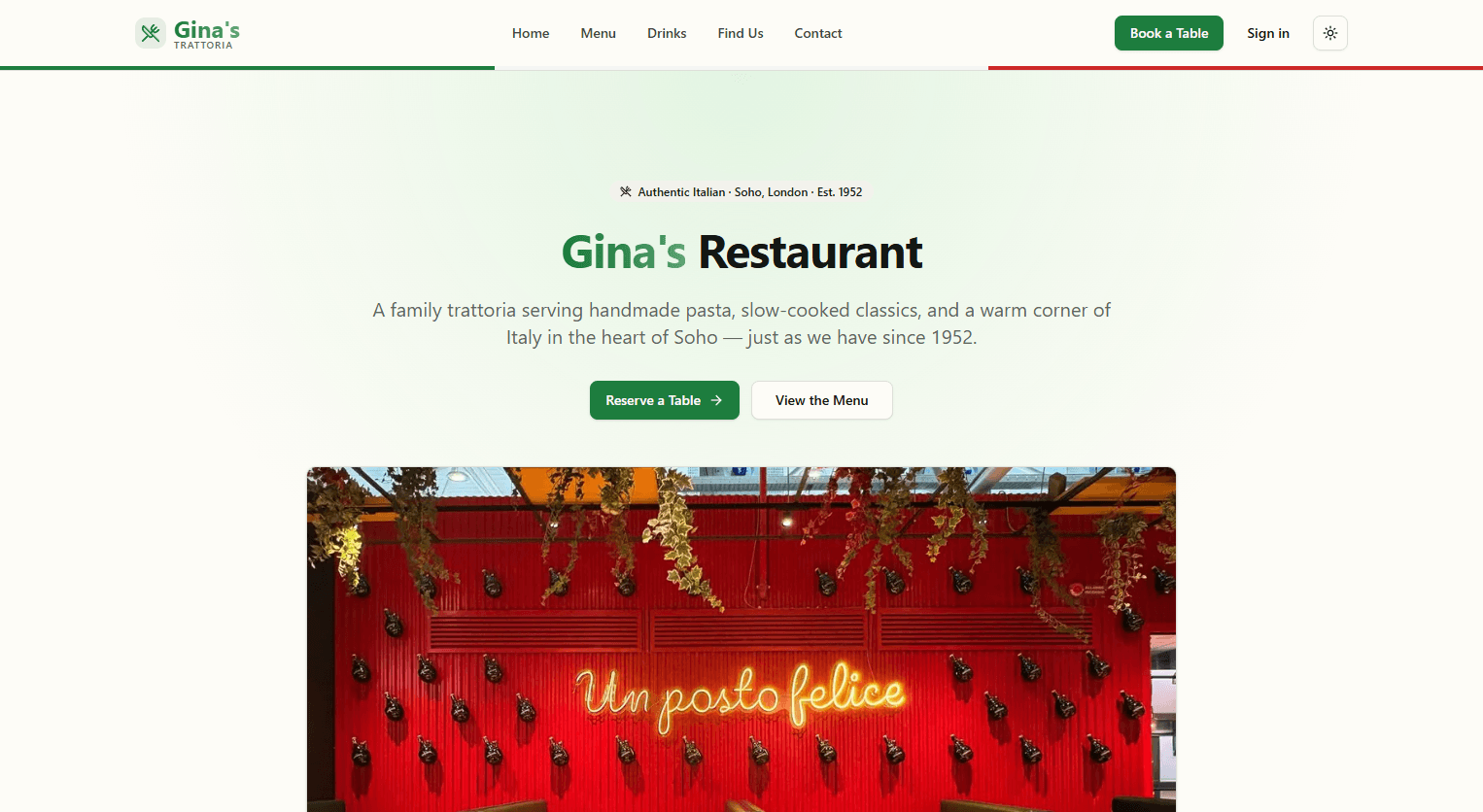
Guests reserve a table, ask about the menu, or check opening hours in a single conversation — the assistant handles it and writes the booking straight to your calendar.

Dental & medical practices
Patients describe what they need and the assistant offers the right appointment slot, captures details, and confirms — reducing phone load on the front desk.
Often all it takes is a calendar
Any appointment-based business can plug in: the assistant is trained on the site's own content and connected to the scheduling the business already uses.
Add an assistant, from £1,000
Added to any website package, priced by how much the assistant does.
Three ways to pay
Pay in full upfront and save 15%, or pay in two halves and save 10%. At the standard price, the second half is due within 30 days of handover.
| Package | From |
|---|---|
| AI chat assistantA chat assistant that answers visitors' questions from everything on your site, day and night. | £1,000 Pay in full (15% off)£850save £150 Two payments (10% off)£450 + £450save £100 Two payments (standard)£500 + £500 |
| + Voice conversationVisitors talk to it and it answers out loud, in natural speech. | £1,500+£500 on the package above Pay in full (15% off)£1,275save £225 Two payments (10% off)£675 + £675save £150 Two payments (standard)£750 + £750 |
| + Guided site toursIt shows visitors round your site, page by page, as it talks. | £1,700+£200 on the package above Pay in full (15% off)£1,445save £255 Two payments (10% off)£765 + £765save £170 Two payments (standard)£850 + £850 |
| + Appointment bookingIt books visitors in during the conversation, straight into your calendar. | £2,000+£300 on the package above Pay in full (15% off)£1,700save £300 Two payments (10% off)£900 + £900save £200 Two payments (standard)£1,000 + £1,000 |
| + 3D avatarA lifelike, lip-synced avatar gives your assistant a face. | £2,300+£300 on the package above Pay in full (15% off)£1,955save £345 Two payments (10% off)£1,035 + £1,035save £230 Two payments (standard)£1,150 + £1,150 |
| Running costsFor the AI and voice services the assistant uses; it depends on usage. | £50 a monthMonthly: not split or discounted |
| RedesignA fresh design for a site or app that already exists. | £250 Pay in full (15% off)£213save £37 Two payments (10% off)£113 + £112save £25 Two payments (standard)£125 + £125 |
Payment figures are worked out on the "From" prices above.
A website and its add-ons are paid as one job, on the total.
Indicative prices: I'll confirm a firm figure once I know what you need.
Each add-on goes on top of one of the website packages.

Your new site, starring in its own promo video
Every website I build comes with a short promo video to launch it, ready to share wherever your customers scroll.
What you get
- Snapshots of your new website, page by page
- Set to music
- Ready to post, with nothing for you to film or edit
- Included in the website's price
- TikTok
- Snapchat
- YouTube
- X (Twitter)
- Threads
- Your own website
- Email newsletters
- Online ads
- Screens in your shop or at events
Why it works
Made to stop the scroll
Moving pictures catch the eye in a busy feed, where a still post is easy to miss.
Shows your site before the click
People see your pages, your look and what you offer before they visit.
A ready-made launch post
Announce your new website with something worth watching.
One video, every channel
Post the same video everywhere, so your business looks the same wherever people find it.
How it works, and how payment goes
Pay in full and save 15%, pay in two halves and save 10%, or pay the standard price. The same plain terms apply to every job, so you know what to expect before you ask for a price.

Custom build & first draft
Every site or app I build is made to order. I aim to deliver a first draft within 2 to 5 working days of getting everything I need from you.
Updates
Once you have agreed the first draft, 3 medium updates are included at no charge. After that, each further update is £50.
Redesign
A redesign of your site or app is £250.Two payments
You pay 50% as a deposit by credit or debit card when you accept the quote; payments are processed securely by Stripe. I begin work only once the deposit has been paid. The other 50% is due when the website is finished and handed over, and I'll email you a link to pay it by card. There are two plans: take 10% off the total and pay the balance when the website is handed over, or pay the standard price and have 30 days from handover to settle the balance.
Pay in full, save 15%
Prefer one payment? Pay the whole price upfront by card when you accept the quote, before I begin, and you get 15% off.
Ownership & missed payments
The site or app remains my property until it has been paid for in full. If a payment is missed, I will suspend the account until it has been paid.

Hosted on ATS, built to be found
ATS Hosting, my own hosting platform, runs the sites I build. It puts your site live, looks after its database, files and backups, works on getting it found with three layers of SEO, and keeps it safe with security checks every night.
What ATS Hosting does
- Every update goes live safely: if one fails, the live site stays as it was.
- Your site's own private database and file storage, with a vector store for AI search.
- Your own domain, with HTTPS set up automatically.
- Nightly backups, encrypted and off-site.
- Two-factor sign-in, private databases and encrypted secrets.
- Room to grow: move up a tier, or let it scale within a range.
Three layers of SEO
- Layer 1

Platform basics
From the first deploy
The groundwork search engines expect, kept right on every update: one address for the site (www and the bare domain agree), a sitemap and robots.txt, search engines told about each update, broken pages caught, speed scored, and Google and Bing set up.
- Layer 2

Code audit
On every update
While the site builds, an AI reads its code against 11 SEO checks, among them titles, descriptions, headings, images, links, structured data, social cards and page speed. Fixes are tested before they're offered, and it never holds up an update.
- Layer 3

Growth assistant
Every day, every week
It reads the site's real search figures from Google and Bing, and finds pages just off page one (ranked 8 to 20), pages that are seen but rarely clicked, and searches no page answers yet. Then it drafts the work: better titles, page improvements, articles, sector pages and outreach. Nothing goes live without approval, and every change is measured.
How it keeps your site safe

Security checks, every night
Every night, ATS checks your website, its database and the server it runs on against the latest list of known security flaws, and watches for warning signs like failed log-ins or unusual activity. If something needs attention, you get a clear explanation of what to fix, and for many issues ATS can prepare the update for you to approve with one click, so problems get fixed before anyone can exploit them.
What it does for you

Google ranking
- Google can find and read every page: one address, a sitemap and broken pages caught.
- Pages that are fast and clearly built, with structured data that can earn richer listings.
- Effort goes to the pages closest to page one.

Marketing
- Titles are rewritten where a page is seen in search but rarely clicked.
- Shared links show a picture and a summary on WhatsApp, LinkedIn and Facebook.
- Articles and sector pages are drafted from what people really search for, and each change is measured after 14, 28 and 42 days.

Peace of mind
- Hosting, database, file storage, domain and backups, all in one place.
- No risky shortcuts: it never pays for links and never posts in forums, the tactics search engines penalise.
- Private and secure, and every change is recorded.
No one can promise a ranking, and I don't. ATS does the work that makes a site easy to find, and shows what it achieved.
Talk to your website from your phone
Every website I build gets its own MCP server. Connect it to Claude once, and you can talk to it from Claude on your phone: ask out loud, the way you'd ask a member of staff, and Claude answers from your site's own live data.
- Built in: an MCP server made for your website. MCP (Model Context Protocol) is the open standard Claude uses to connect to other systems.
- Connect once: add it to Claude as a connector, and it's there in the Claude app on your phone and on your computer.
- Talk to it: ask “Any new enquiries today?” or “Who's booked in tomorrow?” in Claude's voice mode and hear the answer, like talking to a person.
- Only for the people you allow: it asks you to sign in, and it can only see and do what you allow.
 MCP server
AI websites I've built, live today
Open one in a new tab and have a look around, AI and all.
Live siteFour Paws Veterinary Practice
avtar-vet.atshosting.uk
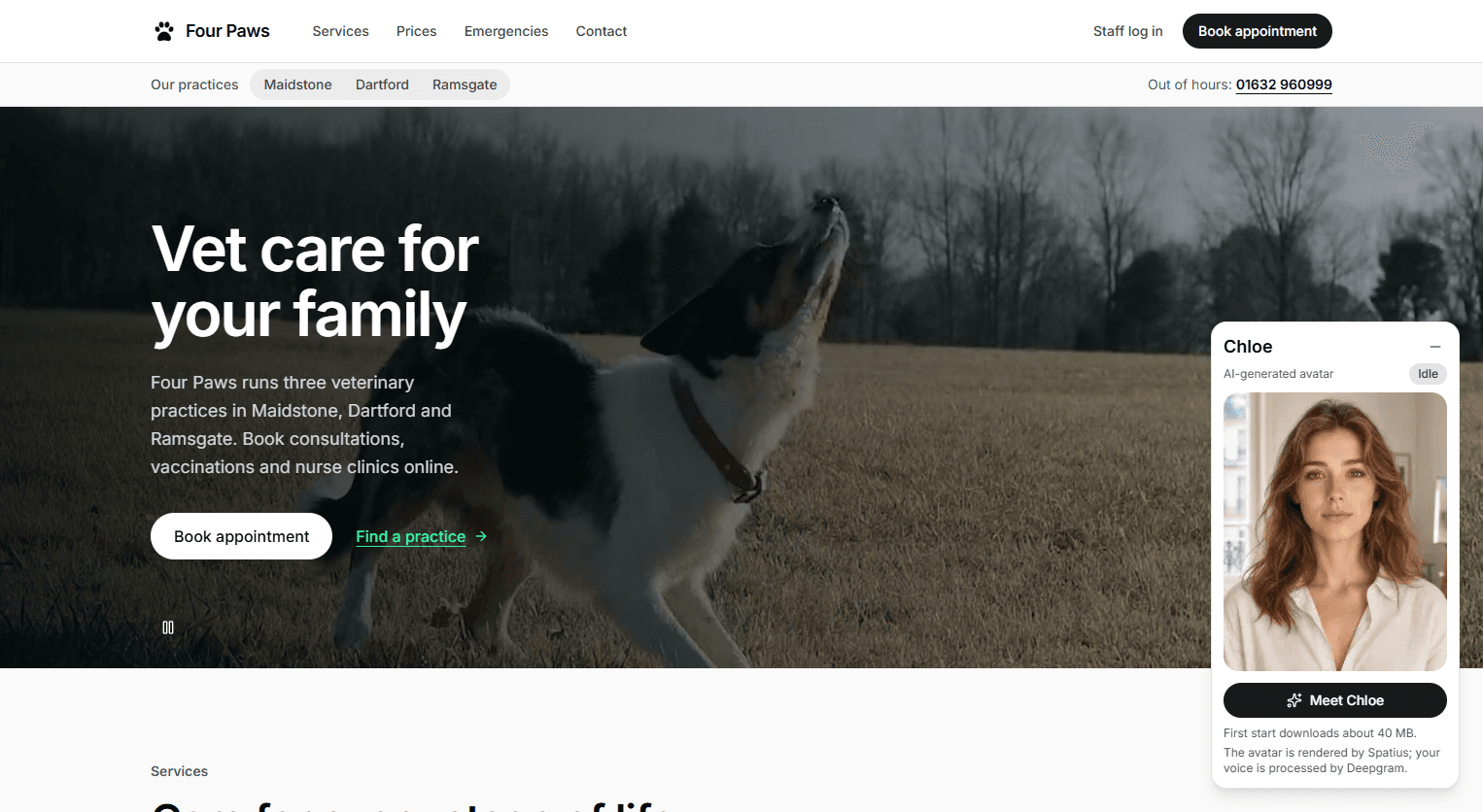
A complete practice system I built, shown working as Four Paws, an invented group of three vet practices in Kent. It's a Next.js website with logins for the team, where clients book appointments online or by talking to Chloe, its AI receptionist. Behind it runs the whole business: a point of sale, stock control, HR with rotas, and financial reports by the day, week or month, so almost any part of the practice can be tracked. It also has its own MCP server, so you can sign in from Claude or any other AI.
See it page by page: Four Paws Veterinary Practice Live site
Tiffany's Tales Book Club
A book club website with an AI side: the AI recommends your next read and explains why each pick fits, and there's a voice you can talk to. Members also keep a reading log, the club's Instagram feed comes in by itself, and the club runs it all from its own admin area.
See it page by page: Tiffany's Tales Book Club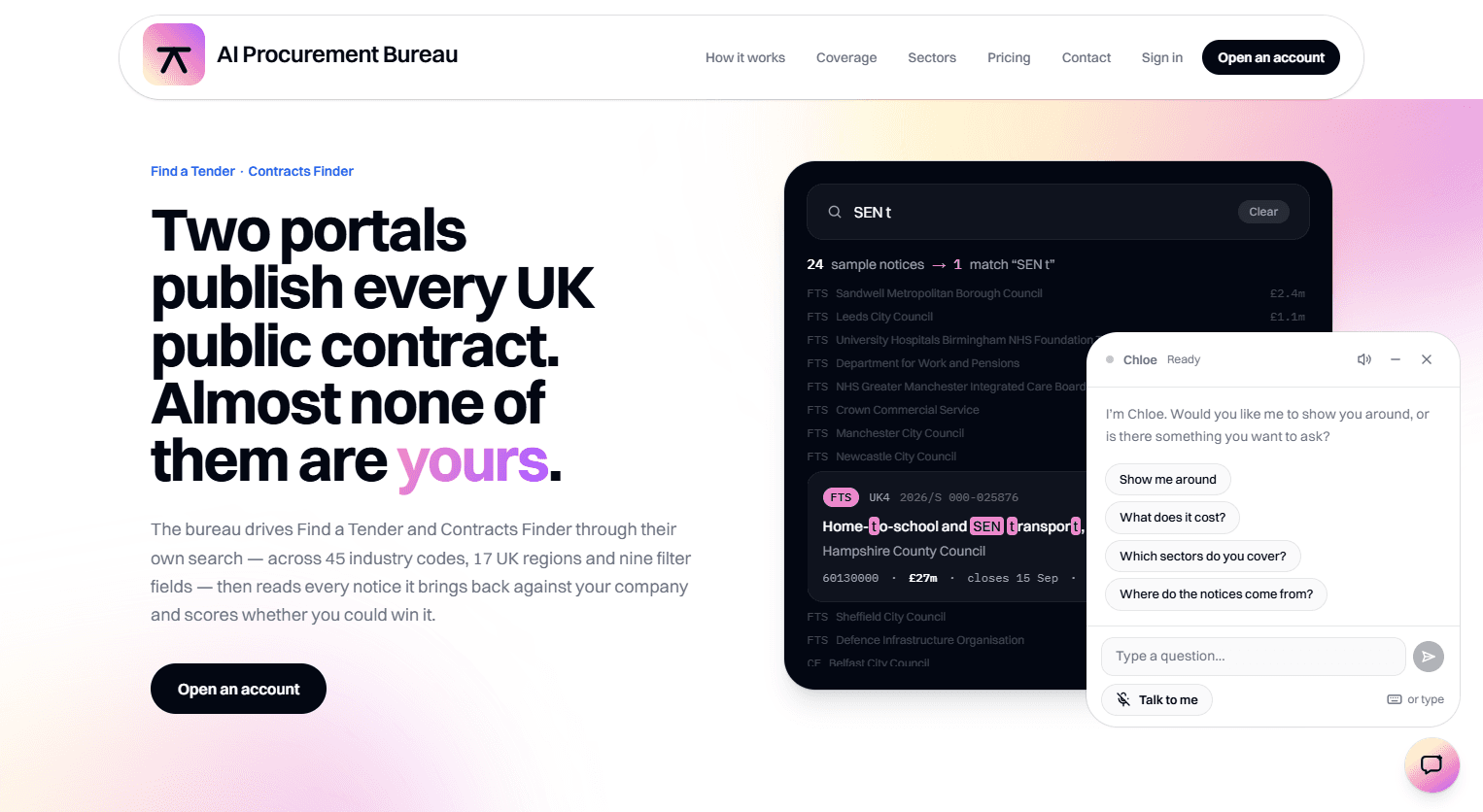 Live site
AI Procurement Bureau
It searches Find a Tender and Contracts Finder, the UK's two public-contract portals, and AI scores every notice against your company. Its built-in assistant, Chloe, shows visitors around and answers questions by text or voice.
See it page by page: AI Procurement BureauInside Four Paws Veterinary Practice
A complete veterinary practice system I built, shown working as Four Paws, an invented group of three practices in Maidstone, Dartford and Ramsgate. Clients read about the services and prices, find their branch and book online, or ask Chloe, the site's AI receptionist, a talking avatar who books appointments and shows them around. Behind the scenes, one system runs all three branches: the diary, patient records, bills and counter sales, stock, the rota and the team, and reports for a day, a week or a month, with a dashboard that compares the branches.
For pet owners
- A page for each branch, with its opening times, a map and directions, plus the services, a price list, emergencies and a contact form.
- Online booking on one screen: the appointment, the pet, a branch, a day and a 15-minute slot, then the owner's and pet's details.
- The earliest free times shown first, other times and branches suggested when a day is full, and a booking reference straight away.
- Chloe, an AI receptionist on every page: a talking avatar who books the appointment by voice or shows you round the site.
Behind the scenes
- Logins for the team with roles: group admins, practice managers and staff each see their own practices.
- A diary for each branch, room by room: check clients in, complete visits, and mark no-shows and cancellations.
- One register of clients and their pets across the group, with alerts, visit history and past bills.
- A point of sale: bills for visits and counter sales, paid by card, cash or insurance.
- Stock control: stock falls as items are sold, deliveries are booked in, and a reorder list shows what's running low.
- HR: team records with roles and pay, and a rota by week or month across the branches, with what each shift costs.
- Financial reports for a day, a week or a month: revenue, net profit after staff and consumable costs, payment methods and how fully the rooms were booked.
- A group dashboard that compares the three branches side by side.
- Chloe's settings: pick her avatar, voice, greeting and instructions.
- Its own MCP server: sign in from Claude or any other AI and work with the system by talking to it.
Four Paws is a working example, so try it: book an appointment at avtar-vet.atshosting.uk (opens in a new tab), or ask Chloe to book one, using made-up details (nothing is emailed), or press View the demo on its staff login for a read-only look round the back office.
Home, with Chloe
The welcome page: a hero with buttons to book an appointment or find a practice, the out-of-hours line in the header, and Chloe, the site's AI receptionist, shown as an AI-generated avatar you can talk to.
Services
The services as photo cards: consultations, vaccinations, nurse clinics, parasite control, neutering, dental, diagnostics, medicines and retail, each with a short description.
Further down the home page
Further down the home page: the out-of-hours emergency line, a band inviting you to book, and a footer with all three branches, their contact details and opening times, and a note that the practice is made up.
Prices
The price list opens with consultations and vaccinations, with each species' cost shown under the treatment where it differs.
Nurse clinics and parasite control
The price list continued: nurse clinics, then parasite control, with a dog's cost set by its weight.
Neutering, dental and diagnostics
The price list continued: neutering, dental treatment and diagnostics, with costs split by species and, for dogs, by weight where it matters.
Emergencies
The emergencies page: the out-of-hours line for urgent care, and each practice's own number for when it is open.
Contact
The contact page: choose a branch, write a message and send it to that practice, with each branch's phone and email details beside the form.
Maidstone
The Maidstone page: the largest of the three practices, open seven days a week, with its opening times, highlights, address, map and directions, and links to the other two.
Dartford
The Dartford page, in the same layout: a neighbourhood practice with weekday appointments and Saturday-morning clinics, and its own opening times, highlights, address, map and directions.
Ramsgate
The Ramsgate page: a seaside practice with a late clinic on Thursdays and morning-only appointments on Wednesdays, and its own opening times, highlights, address, map and directions.
Book an appointment
Booking on one screen: the type of appointment and the pet, the earliest free times, a branch, a day and a slot, then the owner's and pet's details, with Chloe, the AI-generated avatar, on hand to book by voice.
Staff log in
The staff login: sign in by email or username, or press View the demo for a read-only look round the back office.
Today, at Dartford
A branch's Today page, here Dartford: appointments, no-shows, takings and open bills at a glance, then what's up next, who's on duty and the stock running low.
Group dashboard
The group dashboard: pick a day, week or month and compare the three branches by revenue, net profit, appointments and how fully their rooms were booked, in charts and a table.
Users
The back-office logins: each person's role, practice and rota link, with a button to add a new login.
Chloe's settings
Chloe's settings: staff pick her avatar from six AI-generated ones, then set her name, voice, greeting and instructions, and choose the model that writes her replies.
Today, at Maidstone
Maidstone's Today page: the next appointments, each with a Check in button, who's on duty, open bills and the stock running low.
Diary
Maidstone's diary, room by room: each consult room and the nurse room as a column of 15-minute rows, with who is on duty alongside and a switch between the timeline and the room board.
Patients
The group-wide register of patients and clients: search by name, phone, email or microchip, filter by practice or species, and see each pet's owner, last visit and next appointment, with a warning marker for alerts.
Billing
Billing, the point of sale: open bills with their reference, items and status, tabs for what was paid today or in a date range, the total outstanding, and a button for a new counter sale.
Rota
A week's rota at Maidstone: each person's shifts by day, with the room, the hours and what each shift costs, then the hours and cost rostered each day, and visiting staff from another branch shown separately.
Team
The team based at Maidstone: each person's role, hourly rate and status, and whether they have a login, with buttons to edit, deactivate or delete them.
Stock
Stock at Maidstone: its value and the lines that are low or near reorder, then each medicine with what is on hand and buttons to receive or adjust it; the reorder list and service costs are a tab away.
Analytics
Analytics for Maidstone: a day, week or month of revenue, net profit after staff and consumable costs and room utilisation, with revenue by category and payment method, top items and results by clinician.
Practice settings
Maidstone's practice settings: what its public page shows (name, description, highlights, contact details, address, map and directions), its web address and time zone, and tabs for sessions and rooms.
Inside Tiffany's Tales Book Club
The website of a book club in Maidstone. Members sign in, keep a reading log and share reviews, the club's Instagram feed comes in by itself, and Tiffany, the site's AI, recommends the next read and explains each pick, with a voice you can talk to. The club runs it all from its own admin area.
Home
The welcome page — the club's story at a glance, with a warm hello and quick links to join the pack or jump to this month's read.
About
Riette's story — how a love of books and her dogs (Tiffany the chihuahua especially) grew into a cosy, in-person book-club pack.
Book of the Month
The current club read — this month it's The Crossing Places by Elly Griffiths, with a synopsis and a one-tap way to ask the AI about it.
Good Reads
The club's shelf — every book they've read, laid out as covers with star ratings.
Book Reviews
Members' reviews — what the pack is reading and what they thought, each with a rating and the month they read it.
The live @tiffanystales feed — Riette's latest reads and reviews pulled straight from Instagram.
Log a Book
A personal reading log — add any book you've read, give it a one-to-five-paw rating, and keep your own running list.
Tiffany AI Suggestions
The AI recommender — Tiffany suggests your next read and explains exactly why each pick fits your taste.
Admin
The behind-the-scenes admin — manage members, content, the AI's knowledge and voice, and the club's email, all in one place.
Inside AI Procurement Bureau
Finds UK public contracts worth bidding for. It searches Find a Tender and Contracts Finder, the two portals that publish every UK public contract, across 45 industry codes and 17 regions, then AI scores each notice against your company. Searches can run on a schedule, and each run ends in a ranked PDF report by email. Chloe, its built-in AI assistant, shows visitors around and answers questions by text or voice.
Home, with Chloe
The pitch, with Chloe, the site's AI guide, offering a tour or answers by text or voice.
Where the notices come from
Find a Tender and Contracts Finder side by side: which one is current, which is the archive, and what each covers.
Sectors
112 trades across 12 sectors, named the way you'd name them.
How it works
One press runs it all, unattended: scrape the portals, search the notices, rank them against your company, email the report.
Search profiles
A search profile pairs a saved search with a company profile, and can run on a schedule.
The report
A ranked list of leads, one card per lead with the case for and against, and the scores on one chart.
Want an assistant on your website?
Tell me about your business and what your visitors ask most, and I'll tell you what an assistant could take on.